How to configure a Smartlink
Smartlinks are intelligent tracking links that automatically route traffic to the best-performing offers within the same category. Instead of manually assigning traffic to specific offers, the system dynamically selects the optimal offer based on real-time conversion metrics, targeting parameters, daily caps, and publisher reputation.
The ML Algorithm
When a visitor clicks a smartlink URL (/s/{key}), the Traffic Delivery System (TDS) processes the request and selects an offer using a sophisticated machine-learning algorithm, optimizing traffic delivery to best converting offers for this type of traffic/publisher, targeting EPC (Earnings Per Click) is the core optimization metric — for each click EPC decreases, for each conversion it increases. Poorly converting offers automatically removed from rotation and go into exploratory queue to probe, if they start converting in future again.
Factors Considered by the Algorithm
-
Traffic type & Geo-location — Ensures traffic matches offer restrictions and target regions
-
Device & Platform — Mobile, desktop, tablet, and OS-level targeting
-
Publisher reputation — Some offers are only accessible to high-reputation publishers
-
Publisher + Subsource — Each combination is a separate stream for per-subsource optimization
-
Daily caps — Offers that reached their 24-hour sliding window limit are excluded
-
EPC — Real-time earnings per click, analyzed by device, country, publisher, subsource, and traffic type
Offer Selection Flow
-
TDS receives a request with publisher ID, subsource, geo, device, and traffic type
-
System checks smart routing tags to determine eligible offers
-
Available offers are filtered by daily cap (24-hour sliding window) and publisher-specific caps
-
The ML algorithm ranks eligible offers by real-time EPC
-
Top offer gets ~90% of traffic, remaining offers share ~10% for exploration
-
Selected offer must have available cap — if not, the next offer is tried
-
If no offer can be selected, traffic falls back to the Fallback URL
Configuration Sections
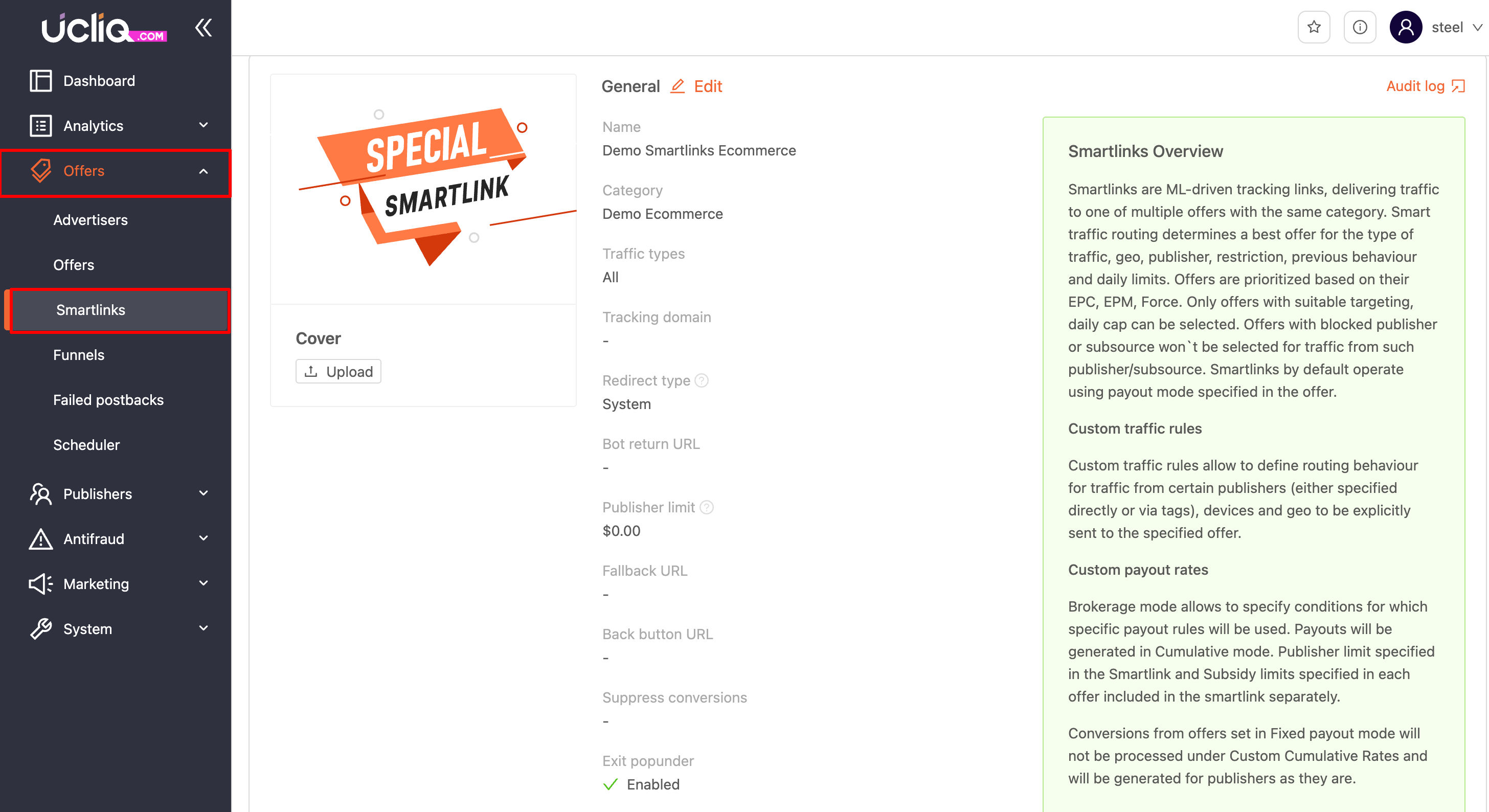
1. General
Core settings that control how the smartlink processes incoming traffic. These are configured at creation and can be edited at any time.
Basic Information
-
Name — Human-readable identifier for the smartlink
-
Category — Filters which offers are eligible — selects all active offers with smart routing enabled in this category (main or additional)
-
Payout model — The payment model applied to offers routed through this smartlink
-
Traffic types — Allowed traffic sources (e.g., push, pop, email, native)
| Publisher limit | Allows to control budgeting for publisher subsidizing |
| Tracking domain | Allows to allocated a fixed tracking domain for this smartlink's campaigns |
Redirect Behaviour
Controls how the visitor's browser is redirected from the smartlink URL to the offer:
-
Default — System's standard redirect mode. General use.
-
HTTP — Redirect via HTTP headers (301/302). For media buying platforms and bots that follow redirect chains.
-
JavaScript — Redirect via JS in the browser. Blocks bots and crawlers that don't execute JS.
Special traffic handling
FieldDescriptionBot return URLAllows to redirect detected bot traffic to a particular linkFallback URLIn case no suitable offer can be found, publisher or subsource are blacklisted - traffic will be redirected there (overrides System-wide fallback URL)Back button URLOverrides backbutton behaviour on Prelands, allowing to send visitor on browser back button click to a particular address
Smartlink Status
StatusDescriptionPublicSmartlink visible and available to all publishersOn requestSmartlink visible to all publishers, but requires the campaign launch will wait on approval by a managerPrivatePublishers won't see this smartlink in their panel, campaigns are launched only by managers and then become visible to the respective publishers
Conversion Filtering
Suppress conversions — When enabled, postbacks with a value below the configured threshold are discarded. This prevents low-value or test conversions from polluting your payout statistics.
Exit Popunder
Handles what happens when a visitor closes the prelander page. When enabled, a popunder window opens behind the prelander so that if the visitor closes it, the popunder redirects them to an alternative offer or destination.
URLs
-
Bot return URL — Redirect destination for detected bots and crawlers. Prevents bot traffic from consuming offer caps.
-
Fallback URL — Backup destination when no offer can be selected (no eligible offers, all offers at cap, or targeting mismatch).
-
Back button URL — URL used when the visitor clicks Back on the prelander. Controls the user journey after a preland exit.
Budget
Sets a spending limit on the smartlink. Can use an existing budget or create a new one. When the budget is exhausted, traffic either falls to the Fallback URL or is subsidised by the platform.
Status
-
Disabled — Not active, no traffic is routed.
-
Private — Visible only to explicitly assigned publishers.
-
Public — Visible to all publishers.
-
On Request — Visible but requires manager approval for publisher access.
Description
Free-text notes for internal use. Not visible to publishers.
2. Statistics
Shows a basic performance report for the smartlink with standard time periods to choose from. Click the Report link to open the full analytics view filtered by this smartlink in a new browser tab.
3. Custom Traffic Rules
Override the AI-driven offer selection by defining rules that route specific traffic to specific offers. When incoming traffic matches a rule, it is directed to the specified offer regardless of what the algorithm would choose.
Rules can be based on:
-
Publisher
-
Publisher tag
-
Geography
-
Selectable offer
-
Devices
For more precise control, use smart routing tags instead — see
SMARTLINKS-SMARTLINKS.mdfor details on publisher tags, advertiser account tags, and offer smart routing tags.
4. Custom Payout Rates
Set individual fixed payments in cumulative mode for traffic that matches specific rules. When a conversion occurs from matching traffic, the fixed payment is applied.
Rules can be based on:
-
Publisher — which publishers receive the custom payment
-
Geo — which countries the payment applies to
-
Devices — which device types qualify
-
Rate — the cumulative payment amount (required)
-
Status — enable or disable the rule