The Average Risk Score feature helps you understand whether the traffic from a specific publisher is trustworthy or suspicious. It shows how often risky patterns were detected, how severe they are, and gives a clear overview of each publisher's traffic quality — broken down by publisher + subsource pair.
Use this tool to:
-
Decide how many risk points warrant flagging or blocking conversions
-
Enable conversion hold (retention mode) for suspicious publishers
-
Block specific publishers or subsources whose traffic underperforms on certain offers
How Risk Scoring Works
Every incoming click is analysed by the fraud detection system. When certain characteristics match known fraud indicators, the click is assigned risk points. The more indicators that match, the higher the score.
Risk scores are calculated per conversion and then aggregated by publisher + subsource pair. This gives you a per-stream view of traffic quality — a publisher might have excellent traffic from one subsource and problematic traffic from another.
The Report Table
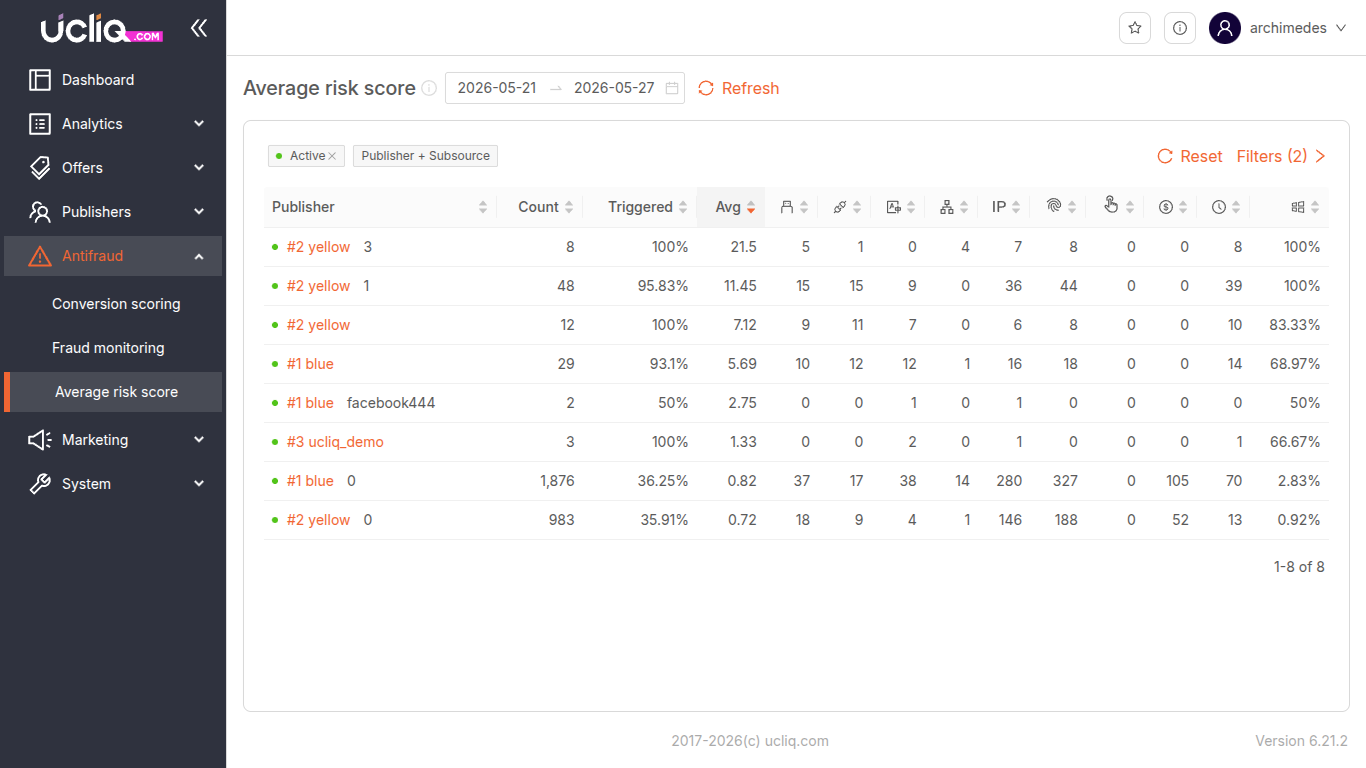
The report is grouped by Publisher + Subsource pairs. Each row represents a unique traffic stream.
-
Publisher — Publisher name, alias, and subsource identifier
-
Count — Total number of conversions in the selected period
-
Triggered — Percentage of conversions where at least one risk pattern fired
-
Avg — Average risk score across all conversions for this pair
Risk Indicator Columns
Following the summary columns, each known fraud signal appears as its own column showing:
-
Triggered count — how many times this indicator fired for this publisher+subsource
-
Percentage — what portion of total conversions triggered this indicator
The full set of tracked indicators:
-
Duplicate Fingerprint — Same device fingerprint reused across conversions
-
Same IP — Too many conversions from the same IP address
-
OS Mismatch — Device OS doesn't match expected values (likely an emulator)
-
Connection Type Mismatch — Traffic from unexpected network types (proxy, VPN, corporate)
-
Language Mismatch — Device language doesn't fit the geo (risk of fake users)
-
Autonomous System Mismatch — Traffic from data centres or cloud providers
-
Timezone Mismatch — Time zone doesn't match geo (common for location spoofing)
-
Touch Support Mismatch — No touch support on a device that should have it (emulator signal)
-
Motivated Source — Traffic appears incentivised (social/incentive platform referrers)
-
Windows Conversions — Over 90% Windows-based traffic (WinSock detection, suggests bot farm)
Each indicator cell includes icons to quickly communicate severity — warning, clock, dollar, windows, and risk-type icons.
Click the More button on any row to drill into the details for that publisher+subsource pair.
Taking Action Based on Risk Scoring
Once you've analyzed a publisher's risk profile, you have several options.
Blocking Publishers
If a publisher consistently triggers fraud patterns and maintains a high average risk score, you can block them from working with specific offers or from the platform entirely. Review their risk score and identify recurring fraud indicators before taking this step.
Blocking Sub-Sources
For affiliate publishers generating traffic through multiple sub-sources, you may choose to block specific sub-sources rather than the entire publisher. This lets you cut off problematic traffic streams while keeping quality streams active.
Conversion Retention Mode
If a publisher's traffic shows signs of potential fraud but isn't clearly malicious, you can enable Conversion Retention Mode. This temporarily holds conversions for manual review before they are processed and paid out. It acts as a safety net — fraudulent conversions are caught before money moves, while legitimate conversions can be approved after inspection.
Auto-hold
If you determine that traffic past certain risk score disproportionally hurt the bottom line, you may chose to set a risk score limit to put conversions matching or exceeding the limit to auto-hold, when you won't be presented or credited to publishers and manager will have to decide whether confirm or decline them. You can set auto-hold on three levels:
-
System-wide level - applies to all offers and publishers, unless overriden
-
Offer level - applied to all conversions for this offer unless overriden on publisher level
-
Publisher level - setting a max risk score for this publisher to have conversions auto-apporoved
Auto-decline
Same as for auto-hold, but conversions will not be withheld for review, but automatically declined, without announcing them to publishers.
Recommended Workflow
-
Filter by date range — use the date picker with quick presets
-
Review Publisher + Subsource rows — sort by Triggered % or Avg score to find the worst performers
-
Inspect risk indicator columns — identify which fraud signals are driving the score for each pair
-
Drill into details — use the More button to see the full breakdown per publisher+subsource
-
Take action — block the publisher, block a specific subsource, or enable retention mode
Use the Filters panel to narrow results by publisher, offer, or date. The Reset button clears all filters. The footer provides pagination for large result sets.